 ™
™Later full-sized iPods look very similar, but the generation matters when you are buying replacement parts, planning a battery or flash-storage upgrade, or comparing refurbished models.
The easiest clues are usually the front material, original capacity, and case thickness. There is one important complication: many iPods now have replacement faceplates, back plates, upgraded storage, or swapped logic boards. On a modified iPod, the exterior color and engraved capacity may no longer describe what is inside.
Quick identification chart
This chart is most reliable when the iPod still has its original case and mechanical hard drive. The terms 5.5 and 6.5 generation are collector shorthand; Apple identifies them as the 5th-generation Late 2006 model and the 120GB iPod classic.
| Common name | Year | Original capacities | Original front | Thickness clue |
|---|---|---|---|---|
| 5th generation | 2005 | 30GB, 60GB | White or black plastic | 30GB thin; 60GB thick |
| 5.5 generation | 2006 | 30GB, 80GB | White or black plastic | 30GB thin; 80GB thick |
| 6th generation | 2007 | 80GB, 160GB | Silver or very dark black aluminum | 80GB thin; 160GB thick |
| 6.5 generation | 2008 | 120GB | Silver or charcoal-gray aluminum | Thin |
| 7th generation | 2009 | 160GB | Silver or charcoal-gray aluminum | Thin |
Step 1: Look at the front plate
This is the fastest way to separate the two main families.
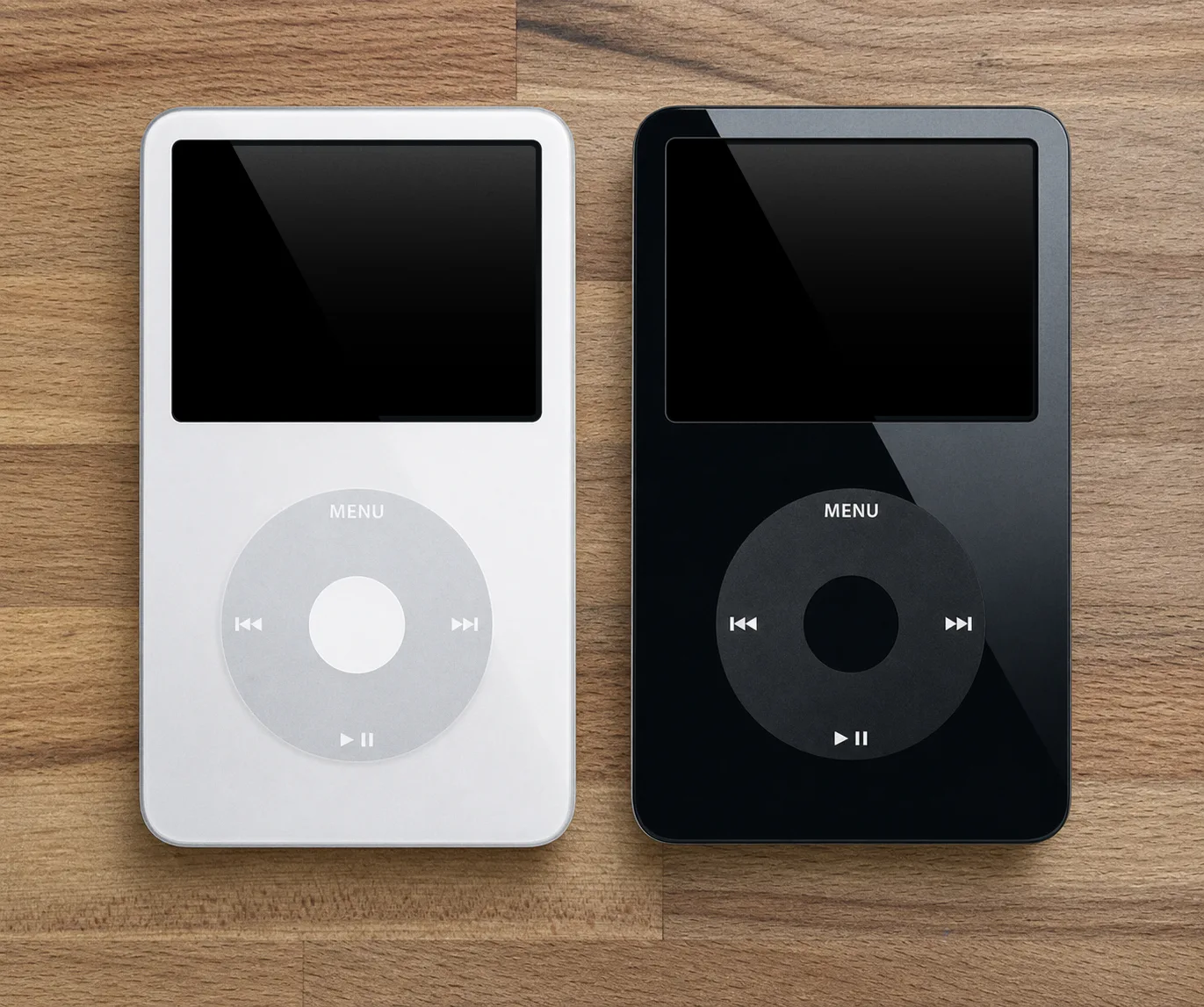
Plastic front: 5th or 5.5 generation
The 5th-generation iPod has a glossy white or black plastic front. If its exterior and storage are original, 60GB indicates a 5th generation and 80GB indicates a 5.5. A 30GB model can be either version.
Aluminum front: 6th, 6.5, or 7th generation
The later iPod classic has a brushed anodized-aluminum front. Apple officially called its original colors silver and black. In the replacement-parts market, the lighter charcoal finish used on the 120GB and Late 2009 thin 160GB models is commonly called gray, grey, or Space Gray. This guide uses gray when that distinction helps identify compatible replacement parts.
- 80GB: 6th generation
- 120GB: 6.5 generation
- Thick 160GB: 6th generation
- Thin 160GB: 7th generation
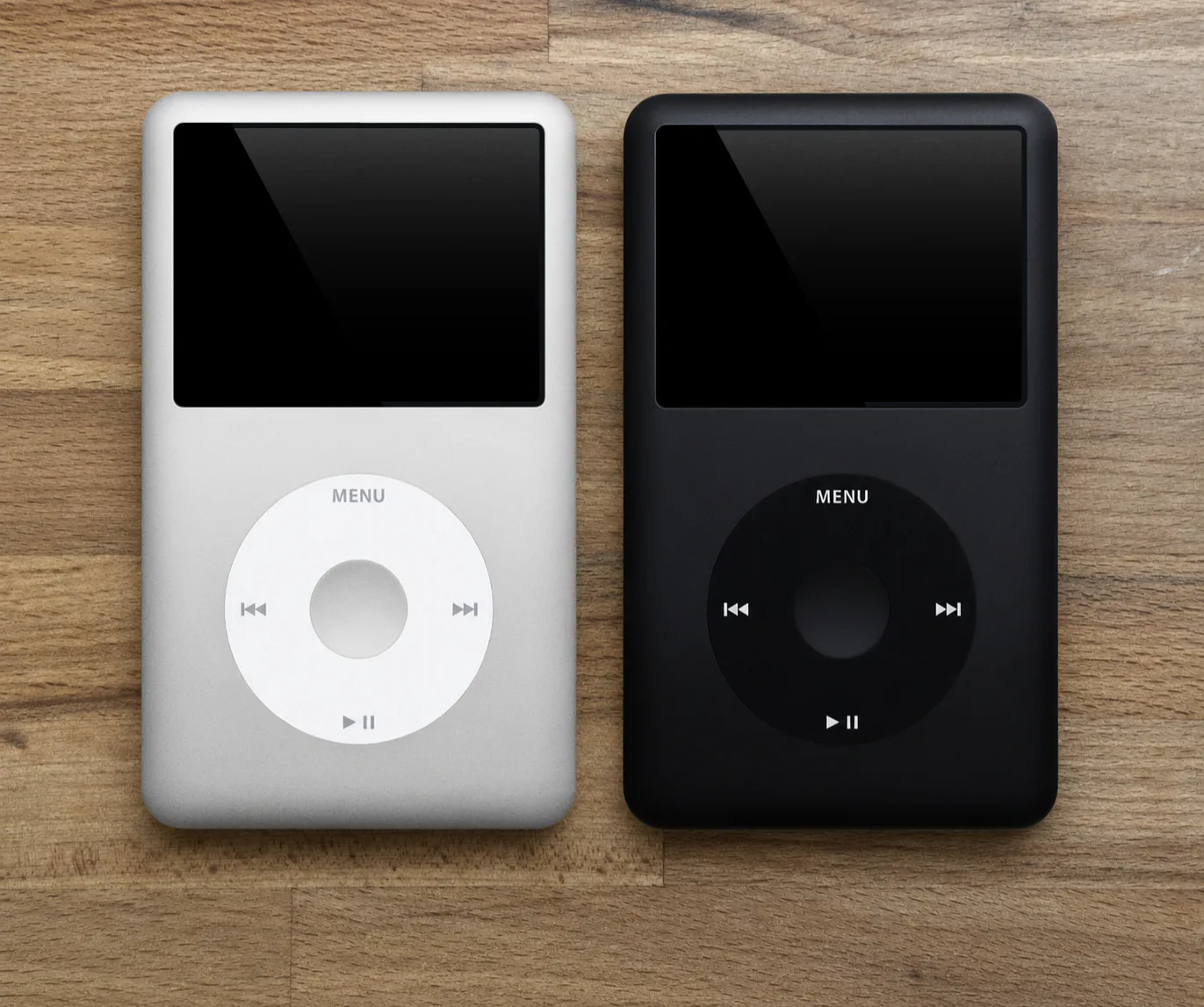
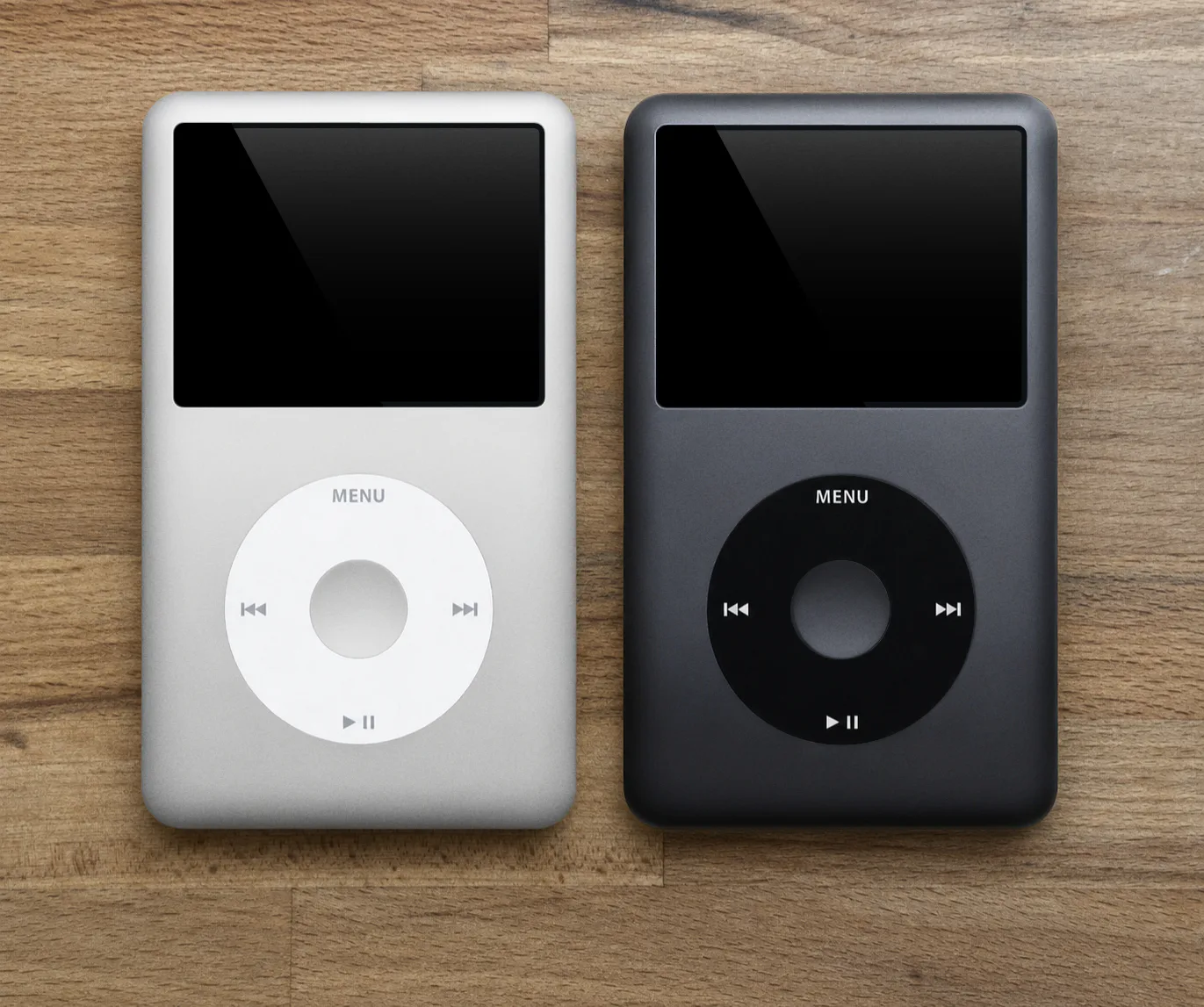
An aftermarket faceplate can make a 5th-generation iPod resemble a later model—or give a later iPod a color Apple never offered—so continue checking before ordering parts.
Step 2: Check capacity and back thickness
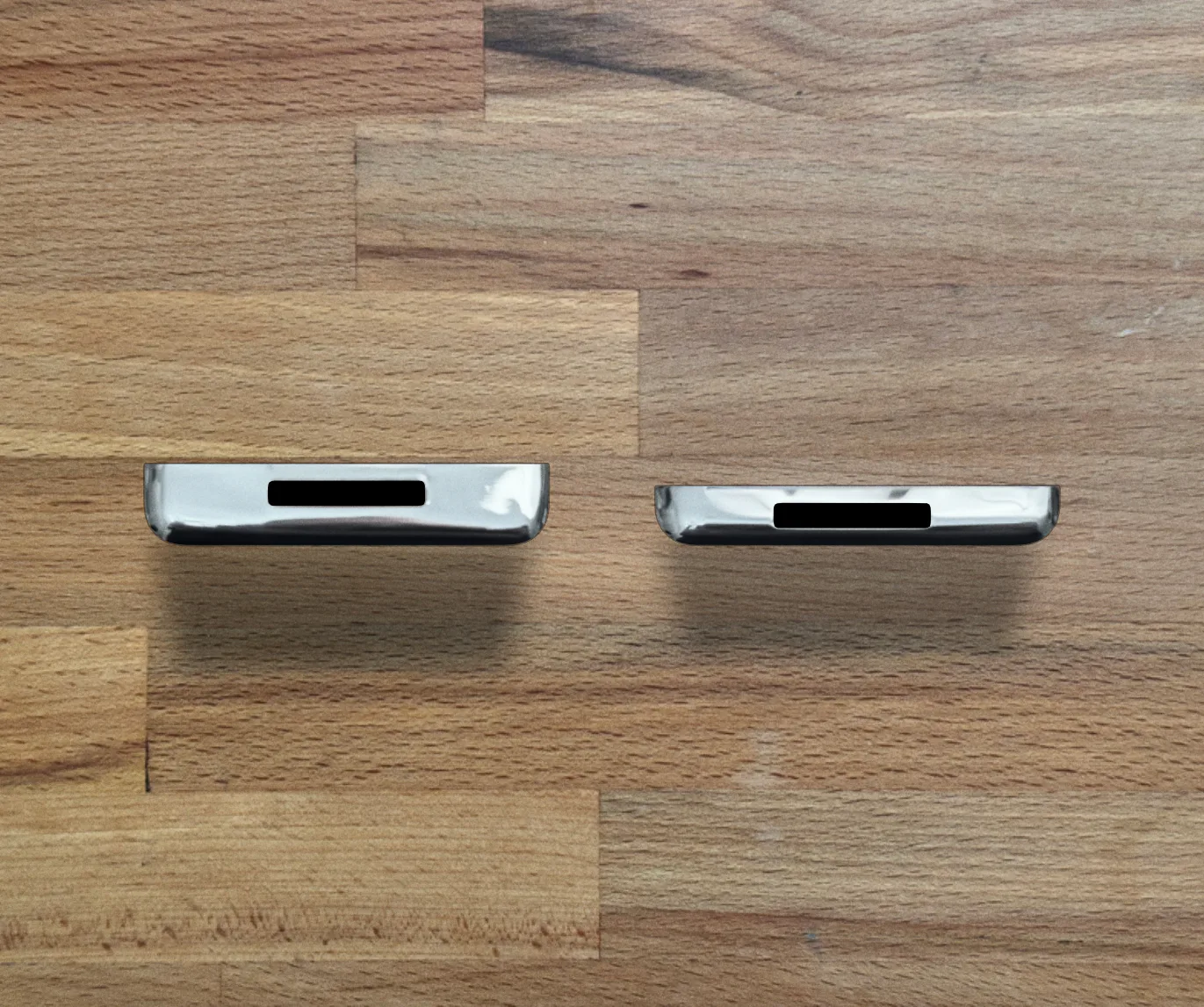
Capacity and thickness work best as a pair. Early high-capacity mechanical drives used two internal platters and required a thicker rear case. Later drive technology allowed Apple to fit 160GB into the thin case.
Two especially useful rules:
- An original thick 160GB iPod is a 6th generation.
- An original thin 160GB iPod is a 7th generation.
The 120GB model was sold only in the thin case and is commonly called the 6.5 generation.
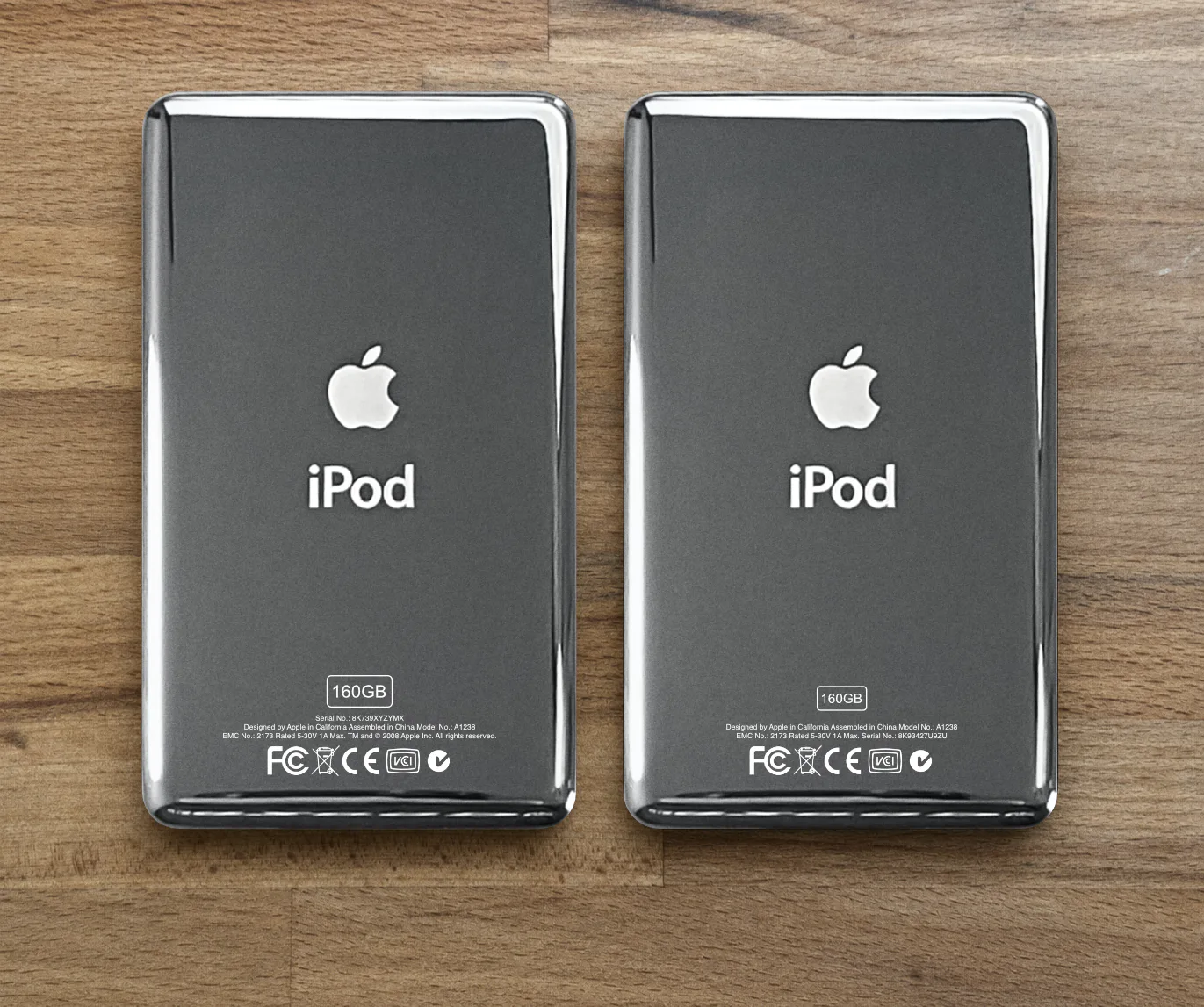
Use the serial-number position on an original back
On the thick 160GB 6th-generation back, the serial number appears directly below the 160GB marking on a line by itself. On the thin 160GB 7th-generation back, the serial number appears at the end of the bottom line of regulatory text.
This is a reliable way to identify the style of an original back casing, but it does not prove which logic board is inside. Replacement back plates are common, so use the engraving together with on-screen information and functional checks.
Thickness matters when buying replacement backs, batteries, headphone-jack and Hold-switch assemblies, internal storage parts, cases, and fitted accessories.
Step 3: Separate a 5th from a 5.5 generation
The 30GB model was sold in both versions, so capacity and thickness cannot separate them. With the original Apple firmware installed, use these clues.
Music Search
Open the Music menu. The enhanced Late 2006 model—commonly called the 5.5—includes a Search option. The original 5th generation does not.
Brightness menu
The 5.5-generation brightness control has a center divider line. The original 5th generation does not. The 5.5 also received a brighter display, but screen brightness itself is not dependable today because of aging displays, replacement LCDs, and changed settings.
Serial-number ending
Apple lists these Late 2006 endings: V9K, V9P, V9M, V9R, V9L, V9N, V9Q, V9S, WU9, WUA, WUB, WUC, and X3N. The Late 2006 U2 Special Edition ends in W9G. Check the serial number shown in Settings > About when possible; engraving on a replacement back may belong to another iPod.
Step 4: Check firmware and hardware features
On the iPod, open Settings > About and scroll to the software version and serial number.
| Model family | Common factory firmware | Important note |
|---|---|---|
| 6th generation | 1.1.2 | 80GB or thick 160GB; factory firmware has the 128GB limit |
| 6.5 generation | 2.0.1 | 120GB; supports inline headphone controls |
| 7th generation | 2.0.4 or 2.0.5 | Late 2009 thin 160GB; supports inline headphone controls |
Use inline headphone controls as a functional check
Inline controls help distinguish an original 6th-generation board from the later hardware:
- 6th-generation 80GB or thick 160GB board: no inline-control support, including after the 2.0.4 conversion.
- 120GB 6.5-generation board: supports inline controls.
- Late 2009 thin 160GB 7th-generation board: supports inline controls.
Use headphones whose controls are known to work. A damaged headphone assembly or remote-contact circuit can produce a false negative, so this remains one clue rather than absolute proof.
Why the model number alone is not enough
The model number engraved on the back is less specific than many people expect. The 2007 80/160GB, 2008 120GB, and Late 2009 160GB versions all use the broad A1238 designation. Replacement backs make that marking even less conclusive.
For a used or refurbished iPod, compare:
- Front-plate material and finish
- Case thickness
- Capacity shown in Settings > About
- Software version
- On-screen serial number
- Supported hardware features
If the clues disagree, assume the iPod has been modified until the logic board can be verified.
Modified iPods: when the usual clues stop working
A flash-modified iPod may report 128GB, 256GB, 512GB, or 1TB even though Apple never sold that model and capacity. Common changes also include custom faceplates, replacement backs, thin-to-thick conversions, custom engraving, and logic-board swaps.
In these cases, on-screen information and supported hardware features are more useful than exterior markings—but no single clue is proof. The most certain identification may require opening the iPod and checking the logic board or its diagnostic information.
Why the generation matters
Storage upgrades
With their original factory firmware, the 6th-generation 80GB and thick 160GB boards and the 120GB 6.5-generation board have a practical 128GB limit. The specialized 2.0.4 firmware conversion offered by MRG Studio removes that limit on compatible boards. The 7th generation supports larger builds without that conversion and remains a popular platform for 256GB, 512GB, and 1TB upgrades.
The 5th and 5.5 generations are also popular for flash storage, but their memory configuration can affect very large music libraries. RAM follows original capacity rather than the 5th-versus-5.5 label: both 30GB models have 32MB of RAM, while the 5th-generation 60GB and 5.5-generation 80GB models have 64MB. The aluminum 6th-, 6.5-, and 7th-generation boards also have 64MB.
Replacement-part compatibility
The plastic-front and aluminum-front families use different frames, Click Wheels, and related parts. Thin and thick cases also require matching rear assemblies.
Features and interface
The aluminum models use the later split-screen interface with album artwork and updated graphics. The 5th and 5.5 generations use the earlier menu design and remain popular with collectors who prefer that interface and their audio characteristics.
Common identification mistakes
“It says 256GB, so it must be a 7th generation.”
Not necessarily. Storage and the back plate may have been replaced, and earlier compatible boards can exceed their original limit after a firmware conversion.
“The back says A1238, so it is a 7th generation.”
A1238 is shared across the later versions, and the back itself may not be original.
“It has a black metal front, so it is a 6th generation.”
That is useful on an original unit, but the later charcoal finish is officially black too, and aftermarket plates are sold in both black and gray.
“Every 160GB iPod is a 7th generation.”
Apple sold a thick 160GB model in 2007 and a thin 160GB model in 2009. Check thickness and original engraving layout.
“Software version 2.0.4 proves it is a 7th generation.”
No. A compatible earlier board can receive the specialized 2.0.4 conversion that MRG Studio offers as a service. Firmware must be considered with the physical hardware.
“The engraving must match the inside.”
Not on many repaired or customized iPods. Polished back plates are frequently replaced because they scratch easily.
Common questions
Frequently asked questions
Is a 120GB iPod Classic a 6th or 7th generation?
It is the 2008 revision commonly called the 6.5 generation. Its factory firmware has the practical 128GB storage limit, but its logic board already supports inline headphone controls.
How can I tell a thick 160GB from a thin 160GB?
The 2007 160GB 6th generation is thick; the Late 2009 160GB 7th generation is thin. On original backs, their serial numbers also occupy different positions in the engraving.
How can I tell a 30GB 5th generation from a 5.5?
On original Apple firmware, the 5.5 has Search in the Music menu and a center divider in its brightness control. Apple’s Late 2006 serial-number endings provide another clue.
Can I identify the generation from the serial number?
Sometimes. Use the serial shown in Settings > About rather than relying on a replacement back.
What generation is best for a 1TB upgrade?
The 7th generation is a straightforward choice because it supports capacities beyond 128GB without a conversion and has 64MB of RAM. Compatible earlier aluminum boards can also support larger storage after the 2.0.4 conversion offered by MRG Studio.
Sources
References
- Apple: Identify your iPod model
- iFlash compatibility chart
- iPod Guide v2.1, identification section, by Yuuiko