 ™
™An old battery does not always fail in one obvious way. An iPod Classic may work for only a few minutes, shut down while changing songs, show inconsistent charge levels, work only when connected, or appear not to charge at all.
Some of those symptoms do point to the battery. Others could be caused by an issue with the cable, wall adapter, USB port, 30-pin dock connector, or original mechanical hard drive. A useful diagnosis starts with the behavior—not an assumption that every power problem requires a new battery.
Quick symptom guide
| What the iPod does | What it may mean | Best next check |
|---|---|---|
| Playtime has gradually become shorter | Battery capacity has deteriorated | Charge fully, then compare actual playback time over more than one cycle. |
| Shuts down during playback or navigation | Battery voltage may be dropping under load | Notice whether it restarts when connected to power. |
| Battery meter suddenly rises or falls | Aged battery or inaccurate charge reporting | Judge it together with runtime and shutdown behavior. |
| Works only while connected | Battery may no longer hold a usable charge | Disconnect only after it has had time to charge. |
| Charges from a computer but not a wall adapter | Wall adapter compatibility is more likely than total battery failure | Use the USB wall-adapter compatibility guide. |
| Does not charge from any known-good source | Cable, dock connector, battery, or charging hardware | Inspect the full charging path before choosing a repair. |
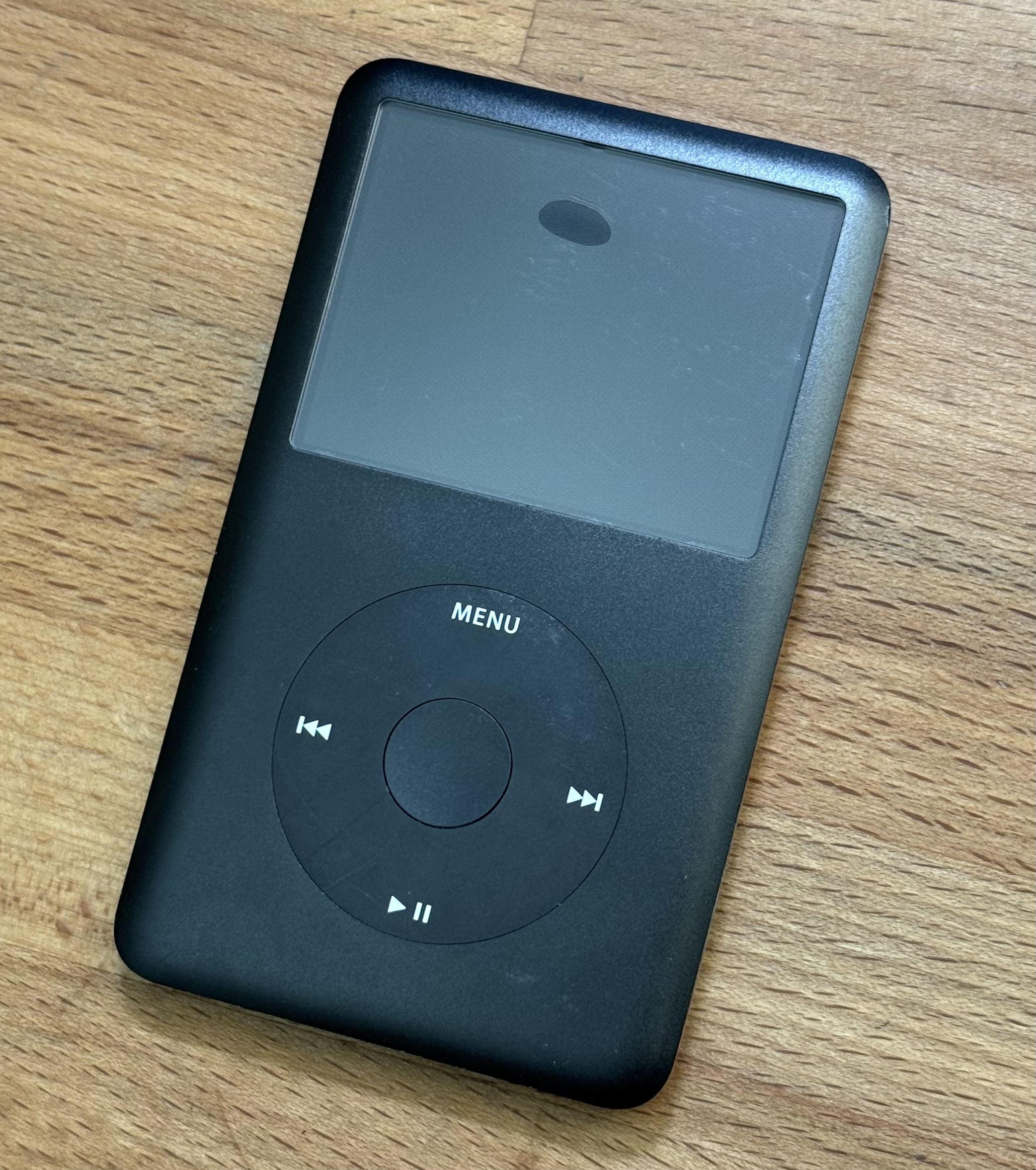
| A dark bubble appears near the upper screen | Possible swollen battery | Stop using and charging the iPod. Arrange a professional battery replacement. |
| Freezes, skips, clicks, or shows a Red X | More suggestive of a hard-drive problem | Check the drive’s SMART data and actual behavior. |
Short runtime is the most common battery symptom
Rechargeable lithium-ion batteries lose usable capacity with age and charge cycles. An iPod can still reach its “Charged” screen even when the battery stores only a fraction of its original energy. The clearest evidence is repeatable runtime: charge it fully, play music under similar conditions, and note how long it operates before shutting down.
One unusually short session is not conclusive. Syncing, restoring, video playback, frequent backlight use, a mechanical drive that repeatedly retries, and very cold conditions can all increase power use. A pattern across several normal playback sessions is more useful.
Unexpected shutdowns and restarts
An aged battery may show a reasonable charge level while the iPod is idle, then drop below the voltage needed to keep running when the hard drive spins up, the backlight turns on, or the device performs another higher-load task. The iPod may shut off, restart, or immediately ask to be connected to power.
If it starts again as soon as external power is connected, the battery becomes a strong suspect. If it freezes, skips songs, clicks, shows a Red X, or repeatedly restarts even while receiving stable power, check the storage and internal connections too.
Why the battery meter can be misleading
The on-screen battery level is an estimate, not a direct measurement of remaining playback time. With an aged battery, the displayed level may fall quickly, remain unchanged for too long, rise after a restart, or disagree with the actual runtime.
Judge the meter together with what the iPod does. A jumping icon plus short runtime and shutdowns is much more conclusive than an unusual icon by itself.
If the iPod works only while connected
An iPod that boots and operates from external power but turns off shortly after being disconnected probably has a battery that cannot store or deliver a useful charge. Before deciding, leave a deeply discharged iPod connected to a known-good source long enough to respond and confirm that the charging screen appears.
If it remains completely unresponsive on every known-good cable and power source, the fault may also involve the dock connector, battery cable, charging circuit, logic board, or another internal component.
Charging trouble is not always a battery problem
An iPod that charges from a computer but not from a wall adapter may have an adapter-compatibility issue rather than a failed battery. Use the same known-good 30-pin cable for both tests, and do not assume that a higher-wattage USB-A charger is automatically compatible.
For the computer test, wall-adapter test, USB-C note, and the signs that point to a cable or dock-connector problem, see why an iPod Classic may not charge from a USB wall adapter. Charging from a computer does not prove that the battery is healthy: an aged battery can accept a charge and still provide very short runtime.
Signs of a swollen battery
A lithium-ion battery can swell as it deteriorates. In an iPod Classic’s tightly packed enclosure, the most useful visible warning sign is a dark bubble or shadow near the top center of the display. If you see one, stop using and charging the iPod and arrange a professional inspection and battery replacement.
Do not keep charging it to “see what happens,” squeeze the case closed, pry against the battery, or puncture it. Stop using the iPod and arrange for careful removal and appropriate battery recycling.
Symptoms that may not be the battery
Freezing, clicking, skipped songs, or a Red X
These are stronger signs of an unhealthy mechanical hard drive. Check the iPod’s SMART data and behavior before assuming a battery replacement will solve them.
Charges only when the cable is held a certain way
Suspect the cable or 30-pin dock connector. Battery condition does not normally change when the plug is moved.
One wall charger does nothing
That can be an adapter-compatibility issue rather than a battery failure. See the USB wall-adapter compatibility guide for the useful comparison tests.
Shuts down only during drive activity
A weak battery can drop under load, but a failing hard drive may also be drawing power while repeatedly retrying. Consider runtime, noises, SMART data, and operation on external power together.
Battery replacement and storage upgrades are separate decisions
Replacing a deteriorated battery does not require replacing a healthy hard drive. Likewise, changing the storage does not automatically solve battery symptoms. The repair should match the evidence.
Battery size must also match the storage hardware and available internal space. An original hard drive or SSD conversion uses the standard-size battery in MRG Studio’s slim-back configurations. A supported 3000mAh battery can be paired with an iFlash Quad, iFlash uDual, or another confirmed thin microSD adapter. See the battery and storage compatibility guide before choosing the larger option.
Common questions
Frequently asked questions
Does charging from a computer prove the battery is good?
No. It shows that the iPod can receive charging power through its dock connector. An aged battery may still charge but provide very short runtime, report its charge inaccurately, or shut down under load.
Why does the battery meter jump up or down?
The meter is an estimate based partly on battery voltage. An aged battery can have unstable voltage under changing loads, so the displayed level may fall suddenly, recover after a restart, or fail to match the remaining runtime.
Is an iPod battery bad if it works only while plugged in?
That is a strong battery-failure symptom, especially when the iPod starts normally on external power but turns off soon after being disconnected. Cable, connector, or charging-circuit problems should still be ruled out.
What should I do if I see a dark bubble on the screen?
Stop using and charging the iPod. Do not press on the display or continue testing it. A dark bubble near the upper part of the screen can indicate battery swelling and needs professional inspection and replacement.
Technical references
Why charger compatibility can vary
- Apple: iPod Classic User Guide — computer and Apple USB power-adapter charging instructions.
- USB-IF: Battery Charging Specification 1.2 — standardized charger detection and dedicated charging ports.